

COMSOL

點選圖案到COMSOL 6.4新版功能介紹(含動畫)
COMSOL is the only CAE software in the world that combines both multiphysics-driven and AI data-driven approaches within a single interface.
AI-Based One software, one user interface, any field.
Simulate real-world multiphysics systems and processes in a virtual environment.
COMSOL breaks through the isolated interfaces of multiphysics CAE operations, accelerating your work within a unified user interface (UI) platform.
COMSOL provides a consistent interface across all modules. Once you learn one module, you can easily use others. In the real world, problems often involve multiple physical aspects, and COMSOL is designed to address these complex scenarios. Additionally, the standalone version of COMSOL supports multi-core computation, enhancing computational efficiency.
COMSOL Multiphysics® is a versatile engineering CAE finite element simulation software platform. Its core product can run independently or be combined with any combination of additional modules to perform CAE finite element simulations for product design and processes in various fields, including electromagnetic, structural mechanics, acoustics, fluid dynamics, heat transfer, and chemical engineering.
The additional modules and LiveLink™ products seamlessly integrate into the software environment, allowing you to follow the same modeling workflow regardless of the specific modeling tasks in any field.
You have the flexibility to mix and match the expansion products based on your simulation needs.
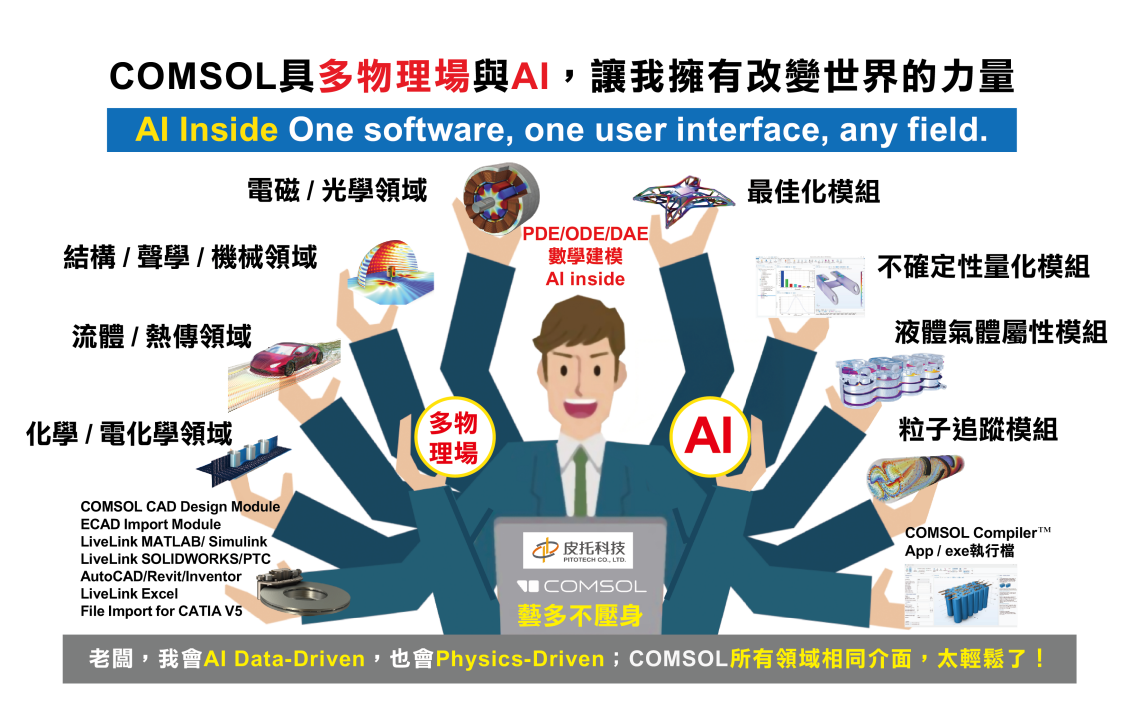
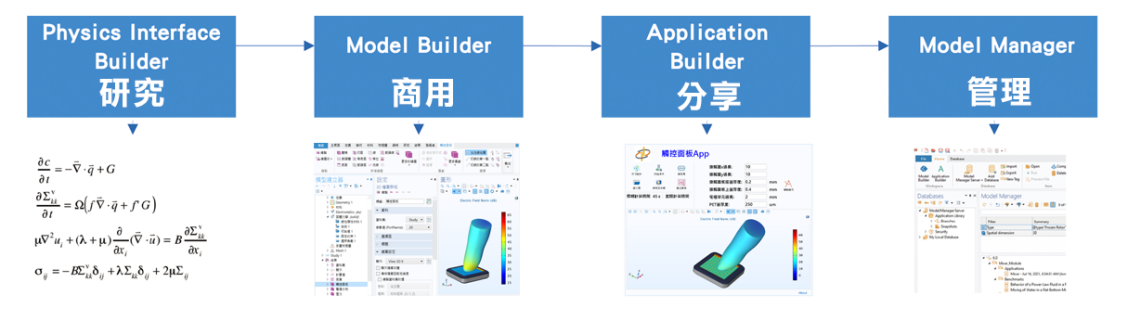
COMSOL addresses the needs of multi-physics research and tackles the challenges of the real world.
COMSOL provides comprehensive solutions for various research areas, meeting the demands of multiple physical phenomena in the real world.
Examples of multi-physics coupling cases:
Case 1: Impact from Magnetism to Fluid Flow
Magnetism generates heat, which in turn leads to stress. This stress alters the fluid flow, which further affects temperature. Ultimately, changes in temperature impact the distribution of magnetism.
Case 2: Impact from Chemical Reactions to Species Distribution
Chemical reactions result in heat generation, which induces stress. This stress, once again, alters the fluid flow, which in turn affects species distribution.
Unified User Interface and Learning Experience
All COMSOL modules use the same interface. Once you've mastered one
module, you essentially have the skills to use all modules. As we often say,
the environment is ever-changing, and people must adapt flexibly.
COMSOL Multiphysics® Product Suite
To gain a deeper understanding of the functionality and applications of each core product, additional modules, and interface modules, please click on the product links below.
|
COMSOL Multiphysics® 主程式 / 模型管理器 / AI / DNN | |||
|
| |||
|
電磁/光學 |
結構/聲學/機械 |
流體/熱傳 |
化學/電化學 |
|
█ RF 模組 |
█ 結構力學模組 |
█ 熱傳模組 |
█ 電鍍模組 |
|
█ 電漿模組 |
█ 聲學模組 |
█ 管流模組 |
█ 腐蝕模組 |
|
█ 半導體模組 |
█ 多體動力學模組 |
█ 分子流模組 |
█ 電化學模組 |
|
█ AC/DC模組 |
█ 地質結構模組 |
█ 微流體模組 |
█ 化學反應工程模組 |
|
█ 波光學模組 |
█ 疲勞模組 |
█ 混合器模組 |
█ 電池設計模組 |
|
█ 幾何光學模組 |
█ MEMS 模組 |
█ 流體力學模組 | |
|
█ 放電模組 |
█ 轉子動力學模組 |
█ 地下水流模組 | |
|
█ 複合材料模組 |
█ 多孔介質模組 | ||
|
█ 金屬處理模組 | |||
|
|
|
█ 高分子流模組 |
|
|
|
|
█ 顆粒流模組 |
|
Through the App Builder in COMSOL Multiphysics®, simulation experts can easily create intuitive, clear, and always-available customized user interfaces based on the models on their computers. These interfaces can be executed either in COMSOL Multiphysics® or on COMSOL Server™.
By using COMSOL Server™, these Apps (UI + FEM Model) can be centrally deployed and managed, while also being easily shared with colleagues, partners, or customers around the world.
COMSOL App = UI + FEM Model = Company-specific parametric design software
(Reusability) = SMART DESIGN
As a manager, how do you preserve finite element knowledge and experience within your organization?
Dear
R&D and finite element design engineers:
What have you contributed to the company, and what have you left behind?
Do managers truly understand your value and efforts?
Let
COMSOL Apps help you.
The finite element models you design become reusable, allowing not only
engineers, but also process engineers and sales teams to use them easily.
With just one license, you can create unlimited simulation applications—unlike other software that requires purchasing multiple licenses.
In
most software development workflows, applications are typically used only once.
COMSOL enables true reusability of both the UI and the model (UI + Model).
Intuitive, Simple, and Easy to Use
Solve any simulation problem with the “3 + 6 Modeling Steps.”
COMSOL Multiphysics® features a clear and user-friendly modeling workflow. By
following the so-called “3 + 6 Modeling Steps,” users can quickly build
models and analyze virtually any simulation problem with ease.
In
addition, COMSOL Multiphysics® offers a high degree of modeling freedom.
Users can add multiple physics interfaces within a single model (true
multiphysics coupling), define different study types, switch materials, and
apply various mesh settings—all easily within the same software environment.
This makes COMSOL the only truly open and accessible multiphysics simulation
platform, bringing advanced simulation capabilities to everyone.
COMSOL Report Generator — Your Best Assistant for Simulation Reporting
Imagine
being able to generate professional and visually compelling simulation reports
with ease, without spending excessive time and effort.
The COMSOL Report Generator was created precisely to meet this need.
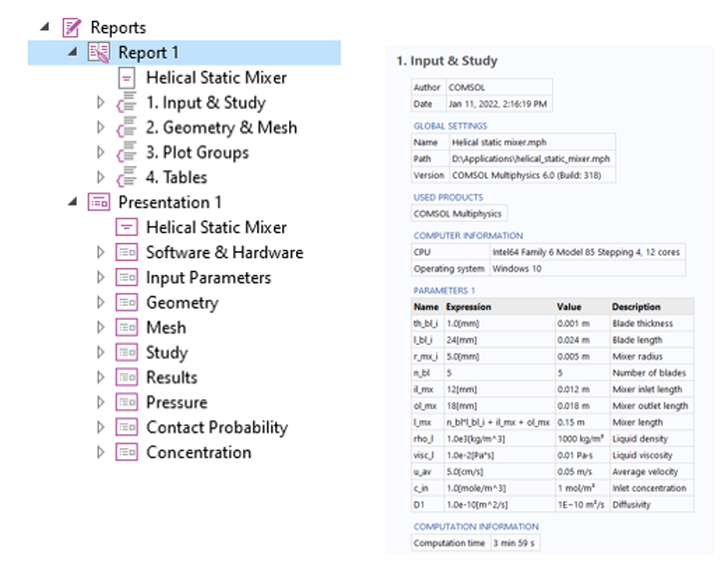
Rapid Document Generation
The COMSOL Report Generator can create various types of documents and automatically update model definitions, inputs, settings, and simulation results. This allows you to easily edit and manage models while keeping reports always up to date.Flexible Report Structure
You can choose from predefined report structures or create custom structures and templates based on your needs. This ensures that each report meets specific requirements while reflecting your own style and creativity.Intelligent Linking to Model Features
The COMSOL Report Generator seamlessly links to features in the model tree. As a result, the report structure accurately mirrors the model itself, enabling readers to intuitively understand your simulation results.Multiple Report Templates
COMSOL provides predefined basic, intermediate, and complete report templates to suit different user needs. Whether you are a beginner or an experienced simulation expert, there is a template designed for you.Multiple Output Formats
Reports can be exported in Microsoft Word® or HTML (web page) formats for easy sharing and editing. In addition, reports can also be exported to Microsoft PowerPoint® (PPT) format, making it simple to present simulation results.
The Most Comprehensive COMSOL Guidebook in Chinese
Written by professional CAE finite element simulation engineers, this book
takes you step by step into the world of CAE.
(Click the image to view details.)
COMSOL Multiphysics ® Metaverse
While we have
built a collaborative VR data visualization platform, that incorporates web
browsers, we are finding that we can run FEM codes from within VR in the
browser, such as COMSOL. This then allows innovative educators like Prof Nathaniel
Kinsey at Virginia Commonwealth University to teach his labs
from within VR. Here is an example video.